Sizing a solar system from an electric bill takes about five minutes of math. Getting it right takes a little more. A system that’s too small leaves your customer with a bill they didn’t expect. One that’s too big costs them money it won’t earn back, and it can get stuck in interconnection review. Either way, you end up redesigning after the site visit, and that’s how deals slip.
This guide walks through the formula, a worked example, and the four checks pros run before a number goes into a proposal. New to reading utility bills? Start with Part 3: Reading your electricity bill.
Quick answer: How to size a solar system
- Add up 12 months of kWh from the customer’s bills
- Find the site’s production ratio, the amount of kWh one kW of panels produces at that spot in a year. Get it from PVWatts, the free calculator from the National Laboratory of the Rockies (formerly NREL), or from your design software.
- Divide annual kWh by the production ratio to get system size in kW DC
- Adjust for the customer’s goal, future loads, roof space, and utility limits
System size (kW DC) = annual kWh ÷ production ratio
How to size a solar system: Working an example
Step 1: Get 12 months of usage
Pull a full year of kWh from the customer’s bills, or from the utility’s usage download. A single month misses the summer air-conditioning peak and the winter heating swing. Our example home uses 10,800 kWh a year (about 900 kWh a month), close to the US average of 10,791 kWh a year (U.S. Energy Information Administration).
Step 2: Find the site’s production ratio
The production ratio is how many kWh one kW of panels produces at this site in a year. It combines two things:
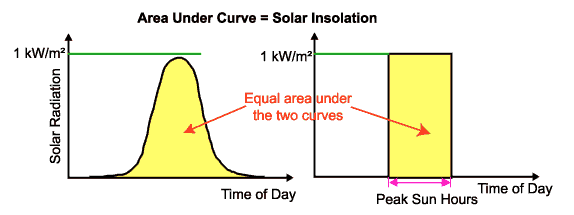
- Sun hours. Weather datasets report insolation in kWh/m²/day. Full sun is about 1 kW/m², so 5.2 kWh/m²/day equals about 5.2 hours of full sun. That’s the Palo Alto average.
- System losses (derate factor). Real systems lose energy to soiling, wiring, heat, inverter conversion, and shade. PVWatts’ default losses work out to a derate of about 0.86. We’ll use 0.80 to stay conservative.
Production ratio = 5.2 hours × 365 days × 0.80 = 1,518 kWh per kW per year
Step 3: Calculate system size
System size = 10,800 kWh ÷ 1,518 kWh/kW = 7.11 kW DC
Prefer the daily version? It gives the same answer: 29.6 kWh a day ÷ 5.2 sun hours = 5.69 kW, then 5.69 kW ÷ 0.80 = 7.11 kW DC.
Step 4: Convert to panels
Divide the system size in watts by the module wattage, then round up.
7,110 W ÷ 430 W = 16.5, so 16 or 17 panels (7.31 kW DC)
Table: Typical production ratios for rooftop systems
|
Region |
Production ratio (kWh/kW/yr) |
|---|---|
|
Pacific Northwest |
1,000–1,150 |
|
Northeast |
1,000–1,300 |
|
Midwest |
1,100–1,300 |
|
Mid-Atlantic |
1,100–1,350 |
|
Southeast |
1,200–1,500 |
|
Mountain West |
1,300–1,600 |
|
California |
1,400–1,800 |
|
Southwest |
1,500–1,800 |

Pick the sizing goal before you trust the math
The formula assumes the goal is 100% energy offset: Produce as many kWh in a year as the home uses. That used to be the default. Now it’s one of several options, and the right one depends on the utility tariff and the customer’s goals.
|
Sizing goal |
What you size to |
When it fits |
|---|---|---|
|
Energy offset |
Annual production ≈ annual usage |
Retail-rate net metering, where exports earn the same as imports |
|
Bill offset |
The kWh that actually move the bill |
Tiered or time-of-use rates, or high fixed charges solar can’t offset |
|
Self-consumption |
Daytime usage, plus what a battery can shift to the evening |
Net billing tariffs like California’s, where exports earn far less than imports |
|
Budget or roof cap |
The most production that fits the limit |
Small roofs, cash buyers, or partial-offset starter systems |
Under net billing tariffs like California’s, a system sized to 100% offset can export a lot of power at a low credit. Often, a smaller array paired with a battery gives the customer better value. And with the federal residential tax credit gone as of 2026, every extra kW a cash or loan customer doesn’t need is a kW they pay full price for (see what drives PV system costs).
Agree on the goal with your customer first, then run the numbers. It’s an easy conversation that heads off the “why is my bill still $80?” call later.
Size for the home your customer will have
Twelve months of bills tell you what the home used. They don’t tell you what it will use. Before you lock in the size, ask about the next few years:
- An electric vehicle (EV). One driven 12,000 miles a year at about 3.5 miles per kWh adds roughly 3,400 kWh a year. At our Palo Alto production ratio, that’s another 2.2 kW, or about six more panels.
- A heat pump. Switching from gas heat or a gas water heater moves that load onto the electric bill. How much depends on the climate, the home, and the equipment, so model it rather than guess.
- Other changes. A pool pump, a home office, a new family member, or an induction range.
Adding panels later means a second permit, a second interconnection, and a second trip to the roof. Sizing for known loads now is usually cheaper. Check the interconnection and roof limits in the next section first, though.
In Aurora, you can add batteries, EV charging, and other loads to the same design as the solar and storage. The proposal then accounts for the loads the home is adding, not just last year’s bills.
Check the number against the roof, the panel, and the utility
A calculated size is a target, not a design. Before it goes in a proposal, check it against three limits.
Does it fit on the roof?
Usable area is smaller than total area once you account for fire setbacks, vents, skylights, and shade. Panels on east- and west-facing planes produce less than south-facing ones, so a roof that fits 17 panels may need 19 to hit the same production. This is where quick estimates usually miss.
Can the electrical service handle it?
For a load-side connection, the National Electrical Code (NEC) 120% rule limits how much solar current the main panel’s busbar can take. A 200 A panel with a 200 A main breaker leaves room for a 40 A solar breaker. A bigger system means a supply-side connection, a derated main breaker, or a main panel upgrade, and the customer needs to know that before they sign.
Will the utility approve it?
Many utilities cap residential system size at or near the home’s historical usage, and some set a hard kW limit. Check the utility’s interconnection rules before you size for future loads. A system that exceeds the cap can stall in review.
Why the formula and a real design might disagree
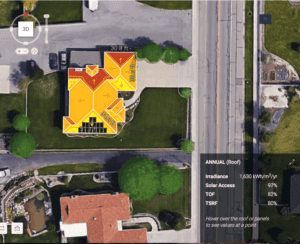
We ran our example home through a full design in Aurora. The simulated system came out close to the formula’s estimate, because this roof is south-facing with no shade. Most roofs aren’t that simple.
The formula treats every panel as if it gets the same sun. A real design accounts for:
- Shade that changes through the year. A tree that’s harmless in June can shade half the array in December, and a neighbor’s second story can shade it every afternoon.
- Multiple roof planes. Different tilts and orientations each produce at a different rate.
- Heat and equipment. Module temperature coefficients and inverter choice shift production in ways a single derate factor can’t capture.
That’s why pros use the formula to set expectations and a simulated design to set the price. In Design Mode, Aurora models shade across the full year for each panel position, so the production estimate reflects this roof, not an average one. In Sales Mode, AutoDesigner can lay out panels to hit the offset target you set. That makes it fast to show a customer two or three sizes during the first conversation.
What happens when the size you sold doesn’t fit the roof?
For Kasselman Solar, it meant new panel layouts, new prices, and frustrated homeowners after customers signed. Accurate designs from the start cut their change orders by 25%.
Solar system sizing FAQ
Q: How do I calculate what size solar system I need?
Divide the home’s annual kWh usage by the site’s production ratio, which is the kWh one kW of panels produces there in a year. A home using 10,800 kWh a year at a production ratio of 1,518 needs about 7.1 kW DC.
Q: How many solar panels do I need for 1,000 kWh a month?
That’s 12,000 kWh a year. With 430 W panels, you’d need about 24 panels in a cloudier area (production ratio 1,200), 20 in a moderate one (1,400), or 18 in a sunny one (1,600). Location changes the answer more than anything else.
Q: What derate factor should I use?
Most residential systems land between 0.75 and 0.86. Default losses in PVWatts (the free calculator from the National Laboratory of the Rockies, formerly NREL) work out to about 0.86. Use a lower number for shade, heat, or heavy soiling, or replace the derate with a simulated production estimate once you have a design.
Q: Should I oversize a solar system?
Only for a reason. Sizing for a planned EV or heat pump usually makes sense. Oversizing past the home’s needs often doesn’t, especially under net billing, where extra exports earn little, or when it pushes past the utility’s interconnection cap.
Q: How does net billing change system size?
When exports earn less than imports, every kWh the home uses directly is worth more than one it sends to the grid. That usually points to a smaller array sized to daytime use, often paired with a battery, instead of 100% annual offset.
Q: What’s the difference between kW and kWh in solar sizing?
kW is the system’s size, or how much power it can produce at once. kWh is energy over time, which is what the bill measures. You size the kW so the system produces the kWh the customer needs.
Get the system size right before the site visit
The formula gives you a starting number. Aurora gives you a design built from this roof’s shade, planes, and the loads your customer is adding. So your proposal holds up at the site visit.